| Scenario | Forela's Domain environment is pure chaos. Just got another alert from the Domain controller of NTDS.dit database being exfiltrated. Just one day prior you responded to an alert on the same domain controller where an attacker dumped NTDS.dit via vssadmin utility. However, you managed to delete the dumped files kick the attacker out of the DC, and restore a clean snapshot. Now they again managed to access DC with a domain admin account with their persistent access in the environment. This time they are abusing ntdsutil to dump the database. Help Forela in these chaotic times!! |
| Files | APPLICATION.evtx, SECURITY.evtx , SYSTEM.evtx |
| Support source | NTDS dumping attack detection |

Previous Steps
1. Convert the .evtx files to JSON format so that they can be worked with.
- In my case, I used the tool `Chainsaw`.
- To use this tool, we need to navigate to the directory where our .evtx files are located and run this command (I placed Chainsaw in /opt).
/opt/chainsaw/chainsaw dump *.evtx --json > events.json 2. Have the jq tool available to query JSON files
- With `jq` we can extract specific information from JSON by applying different filters.
- Using this tool we will can query our JSON in a nested way. For example, with this file named `product.json`:
{"product":
	{
	"productID": 101,
	"productName": "Wireless Mouse",
	"dimensions": {
		"width": "2.5 inches",
		"height": "1.5 inches",
		"depth": "4 inches"
		}
	}
} - If we want to access of the `depth` field value we will have to use a command like this:
cat product.json | jq '.product.dimensions.depth' or
cat product.json | jq '.product | .dimensions.depth' Tasks
Task 1. When utilizing ntdsutil.exe to dump NTDS on disk, it simultaneously employs the Microsoft Shadow Copy Service. What is the most recent timestamp at which this service entered the running state, signifying the possible initiation of the NTDS dumping process?
Hint
- In the System event log, filter for Event ID 7036 and look for the mentioned service name. Once spotted, go to the details tab, and expand the System option to get the event time in UTC.
Answer
- 2024-05-15 05:39:55
-
From resolving
CrownJewel-1, we know that the event responsible for changing the states of a service is7036and that the name of the service isVolume Shadow Copy. -
We will use this command to retrieve all the timestamps of that event for that service and remove the duplicates:
cat events.json | jq '.[].Event | select(.System.EventID == 7036) | select(.EventData.param1 == "Volume Shadow Copy") | .System.TimeCreated_attributes.SystemTime'|sort -u 
- Now we will only need to keep the most recent timestamp.
Task 2. Identify the full path of the dumped NTDS file.
Hint
- In Application Event Log, filter for Event ID 325. This Event ID is recorded whenever a new database (new copy of NTDS.dit database) is created by the database engine.
Answer
- C:\Windows\Temp\dump_tmp\Active Directory\ntds.dit
- First, we will filter by
ntds.dit:
cat events.json | grep -i ntds.dit 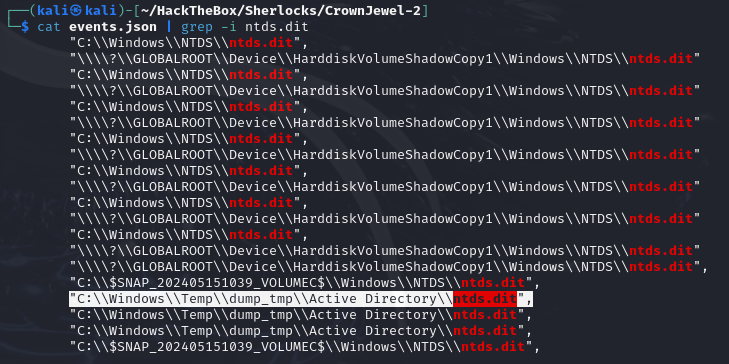
-
Any path different from
Windows/NTDS/ntds.dit(the default path forntds.dit) is indicative of malicious behavior. -
Of all of them,
C:\\Windows\\Temp\\dump_tmp\\Active Directory\\ntds.ditseems to be the one, as naming a directory dump_tmp suggests the intention to create a temporary dump.
Task 3. When was the database dump created on the disk?
Hint
- This would be the time of the same event when database copy was created(Event ID 325).
Answer
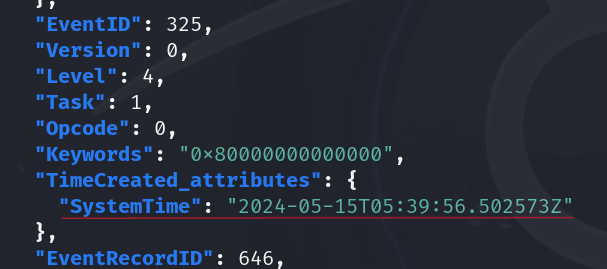
- 2024-05-15 05:39:56
- We know the location where the database was dumped, so we will filter the events by the
dump_tmpdirectory:
cat events.json | jq '.[].Event' -c | grep -i dump_tmp | jq . -
It will return three events with IDs
330, 325, 327. -
Since event
325is the one that is triggered when the new database is created, we will use its timestamp.
Task 4. When was the newly dumped database considered complete and ready for use?
Hint
- 'In Application Event Log, filter for Event ID 327. This Event ID is recorded whenever a newly created database (new copy of NTDS.dit database) is detached by the database engine and marked ready to use.'
Answer
- 2024-05-15 05:39:58
- After event
325, event327is executed, which indicates that the database has been detached, so the answer should be the timestamp of event327that we retrieved earlier.
Task 5. Event logs use event sources to track events coming from different sources. Which event source provides database status data like creation and detachment?
Hint
- Look at the Event source in Events from question 2 to 4.
Answer
- ESENT
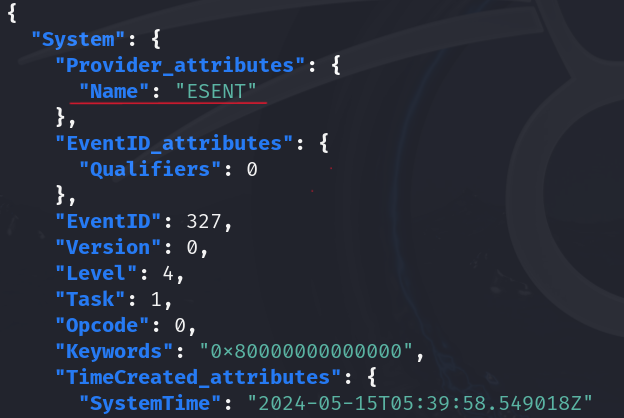
- The event source that provides the status of the database is
ESENT, as we can see in the events we retrieved in question 3.
Task 6. When ntdsutil.exe is used to dump the database, it enumerates certain user groups to validate the privileges of the account being used. Which two groups are enumerated by the ntdsutil.exe process? Give the groups in alphabetical order joined by comma space.
Hint
- In Security Logs, filter for Event ID 4799 . Look for Events in between the timeframe of incident identified so far. Identify the events where process name is C:\Windows\System32\ntdsutil.exe .
Answer
- Administrators, Backup Operators
-
The process that is triggered when groups are enumerated is
4799. -
We will retrieve the names of the groups displayed in the
.EventData.TargetUserNamefield, filtering by event4799when is called byntdsutil.exe:
cat events.json | jq '.[].Event | select(.System.EventID == 4799) | select(.EventData.CallerProcessName | test("ntdsutil.exe")) | .EventData.TargetUserName'|sort -u - It will return:
- “Administrators"
- "Backup Operators”
Task 7. Now you are tasked to find the Login Time for the malicious Session. Using the Logon ID, find the Time when the user logon session started.
Hint
- Since this is a domain environment we would want to use Kerberos events to find the timestamp. Filter for Event ID 4768 and 4769. From here identify the Event Where Account Name is a user account name and not any service or machine account (Starting with a $) in the event 4768. This event will be immiediatly followed by a 4769 event with the same Subject Username. Now add another event id 5379 in the filter. These new events have the Logon ID we are tracking. Notice that timestamp of all these events are same as they happened right after each other. This will be the logon time
Answer
- 2024-05-15 05:36:31
-
As the hint states, authentication in domain environments is carried out with
Kerberos, and it is associated with events4768and4769. -
First, we look for a username in event
4768that is neither a service nor a machine:
cat events.json | jq '.[].Event | select(.System.EventID == 4768) | .EventData.TargetUserName' -
This returns:
- “DC01$"
- "DC01$"
- "Administrator”
-
The only one with a username is
Administrator. -
We will look for the
4768event ofAdministrator:
cat events.json | jq '.[].Event | select(.System.EventID == 4768) | select(.EventData.TargetUserName == "Administrator")' 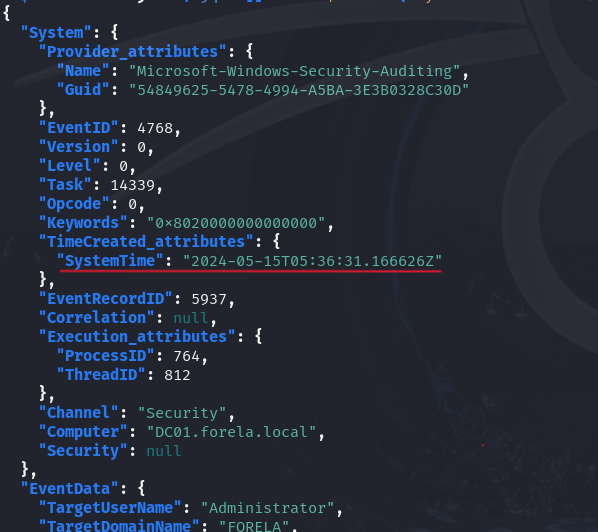
-
We keep the timestamp down to the seconds, as the hint tells us that events
4768,4769, and5379are executed sequentially (one immediately after the other). -
Now we need to search for the events that contain the logon ID, which are the
5379events. -
We filter by the previous timestamp.
cat events.json | jq '.[].Event | select(.System.EventID == 5379) | select(.System.TimeCreated_attributes.SystemTime | test("2024-05-15T05:36:31"))' - It returns 3 events with logon ID
0x8de3d(in theSubjectLogonIdfield) and all with the same timestamp, the same one we used to filter. That is the answer to the question.
That's it!
