In this article
What is Kerberos?
Kerberos is an authentication protocol that utilizes symmetrical encryption, commonly AES, and a reliable third party to validate users and services within a network. It was developed by MIT and is used in systems such as Windows Active Directory and Linux, typically using port 88 and operating over both, TCP and UDP protocols. Since 2000 is the default authentication package for Windows.
The name comes from the mythological creature Cerberus, which protects the doors of the Underworld. Similarly, Kerberos protects the ‘doors’ of your computer systems.
Components
- KDC (Key Distribution Center): The reliable third party, a server that manage authentication and ticket issuance.
- AS (Authentication Server): Part of KDC responsible for verifying the user’s identity
- TGS (Ticket Granting Server): Part of KDC responsible for ticket issuance for service usage.
- Client: User or machine that request access to a service.
- Service Server: Provides resources to authenticated clients.
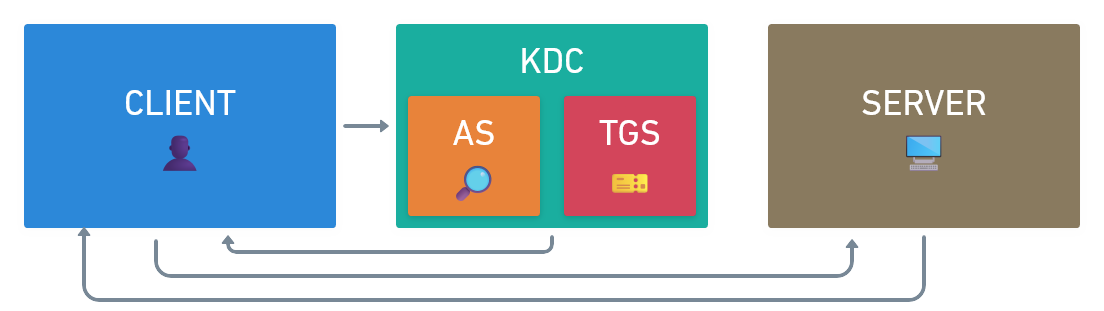
Authentication Flow
- The Kerberos flow starts with the Client.
- The Client communicates with the KDC (which includes the AS and the TGS).
- The KDC does not communicate directly with the Server in the authentication flow; instead, the Client acts as an intermediary by presenting the tickets to the Server.
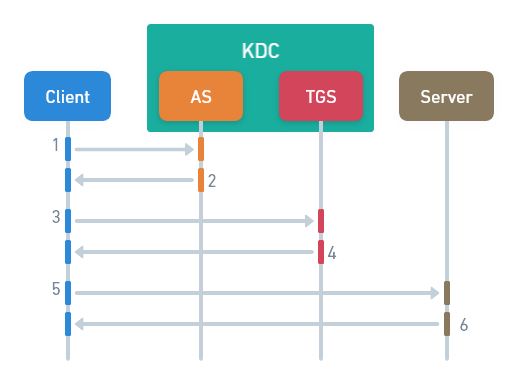
Let’s take a deeper look at this authentication flow, step by step.
1. CLIENT -> AS
-
The Client creates a message with its data and the service data is trying to access, to send it to the AS.
-
Message creation.
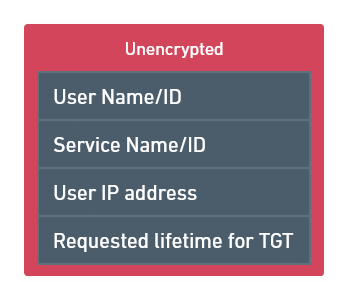
-
Sending message to the AS.
-
2. AS -> CLIENT
-
The AS validates Client’s message and responds to it.
-
Client message validation:
- The KDC has a list of users and user secret keys.
- The AS checks if the User Name/ID is in the lists of users and obtains the User Secret Key to encrypt first message.
-
Messages creation:
- The AS creates two messages, one of them is the Ticket Granting Ticket (TGT).
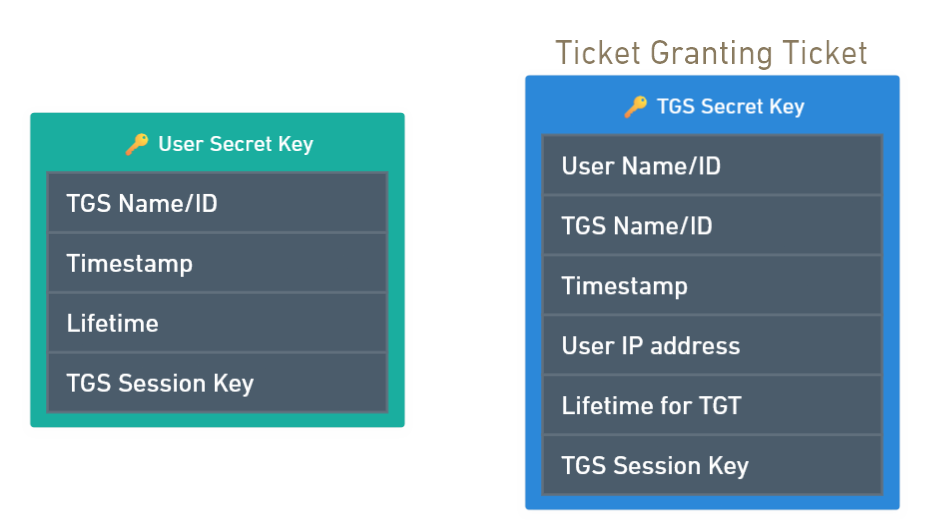
- The AS creates two messages, one of them is the Ticket Granting Ticket (TGT).
-
Sending message to the Client.
-
3. CLIENT -> TGS
-
The Client decrypts the first message and obtains TGS Session Key to encrypt one of the new messages it will create.
-
First message decryption:
- The Client enters its password.
- The AS applies a hashing function to the Client’s password (along with a salt added to it) to generate User Secret Key.
- The Client use this key to decrypt first message.
- Now, the Client has access to the TGS Session Key.
-
Messages creation.
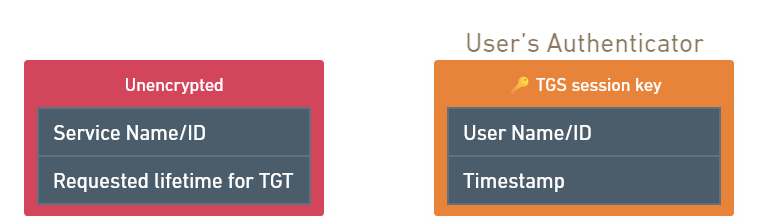
- The Client creates one unencrypted message with the service is trying to use.
- Also creates the User Authenticator and
encrypts it with the TGS Session Key obtained previously.
-
Sending Ticket Granting Ticket (received from the AS) and new messages to the TGS.
-
4. TGS -> CLIENT
-
The TGS receives the messages, validates the service and the user, and sends new messages to Client.
-
Service check:
- Verifies if the service is in the KDC service list and obtains Service Secret Key to encrypt Service Ticket (created later).
-
TGT decryption using TGS Secret Key.
-
User Authenticator decryption using TGS Session Key (Do not confuse with TGS Secret Key).
-
Authentication Validation:
- Checks that the User Name/ID in TGT and User Name/ID in User Authenticator match and compares timestamp.
- Compares the IP address of the TGT with the IP address of the sender of the message.
- Verifies the TGT lifetime is not expired.
-
TGS Cache check:
- The TGS uses TGS Cache to verify that the received authenticator is not already in the cache.
- If the authenticator is not already in the cache, the TGS adds it.
- This process provides replay protection.
-
Messages creation:
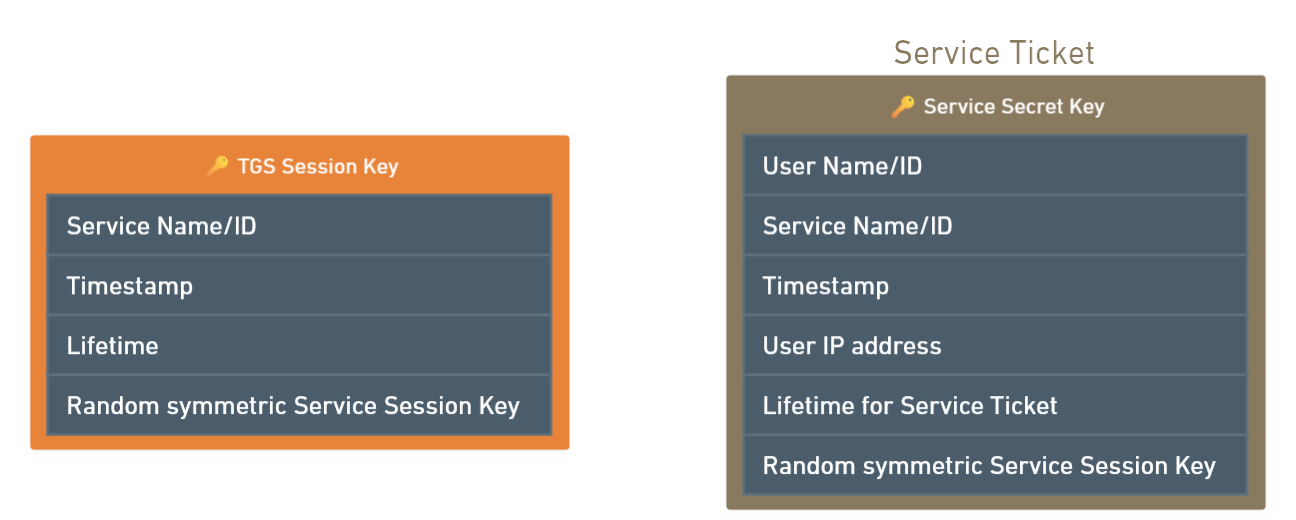
- The TGS creates two messages, one message encrypted with TGS Session Key and another encrypted with Service Secret Key, the Service Ticket.
- Sending messages to the Client.
-
5. CLIENT -> SERVER
-
The Client decrypts first message, creates new User Authenticator and sends it to the Server.
-
First message decryption:
- Decrypts first message using the TGS Session Key (previously obtained from the AS response).
- Now can access to the Service Session Key.
-
New User Authenticator creation.
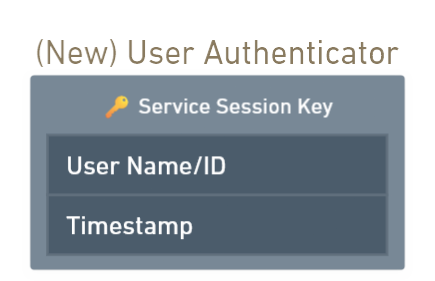
- Sending Service Ticket (received previously from the TGS) and new User Authenticator to the Server.
-
6. SERVER -> CLIENT
-
Server decrypts both messages, validates the data they contain, creates a service authenticator, and sends it to the Client.
-
Service Ticket decryption:
- The Server decrypts the Service Ticket using its Secret Key.
- Now, has access to the Service Session Key.
-
User Authenticator decryption using the Service Session Key.
-
Data validation:
- Checks the User Name/ID in Service Ticket and User Authenticator match.
- Compares the timestamp.
- Compares the IP address of the Service Ticket with the IP address of the sender of the message.
- Verifies the Service Ticket lifetime is not expired.
-
Service Cache validation:
- The Server maintains a cache of authenticators recently received from clients.
- If the User Authenticator is not already in the cache, the Server adds it.
- This process also provides replay protection.
-
Service Authenticator creation.
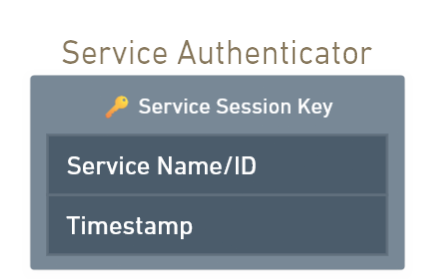
- Sending Service Authenticator to the Client.
-
7. CLIENT
-
The Client receives Server Authenticator and verifies the data.
-
Service Ticket decryption
- The Client use the Service Session Key (previously obtained from the TGS response) to decrypt the Service Ticket.
-
Data verification
- Confirms that the service is the expected one.
- Checks the timestamp.
-
Service is saved in the Client Cache.
- The Client also has a cache.
- If the Service is not already in the cache, it is added to it.
-
After this entire process, the client will have access to the Service.
How secure is Kerberos?
You might think this protocol is impregnable, after all, it’s a three-headed dog protecting our systems, only a four-headed dog can defeat it and everyone knows that four-headed dogs don’t exist…
Well, I’m sorry to say that Kerberos is not safe from cyberattacks. Here are some of the most common techniques that attackers use to exploit vulnerabilities in Kerberos:
-
Pass-the-Ticket (PtT) - T1550.003
In other words: stealing a valid ticket and impersonating the legitimate user with it to gain unauthorized access to resources.
How does the attacker do this? The attacker must have access to a system where the legitimate user has already authenticated with Kerberos. This access can be gained through various methods, such as malware, phishing, or physical access.
After gaining access, the attacker can extract the Kerberos ticket stored in the system’s memory. There are tools like Mimikatz that are commonly used, among other purposes, to extract these tickets. Now the attacker can inject the stolen ticket into another system to impersonate user without a password.
-
Kerberoasting - T1558.003
Basically, the attacker needs two things: access to any account within an Active Directory environment (even low-privilege accounts), and a weak password. The common objective? Privilege escalation.
Authenticated in the Active Directory environment, the attacker enumerates the different service accounts and the Service Principal Names (SPNs) associated with them, looking for a specific service account, like a database service for example.
Then, the attacker requests a Service Ticket for the service account using its SPN.
Now, there is a problem for the attacker: the TGS is encrypted with the service account password, or more accurately, a hash of that password (NTLM hash). However, the attacker knows this and will try to crack it offline. The weaker the password, the easier it is to decrypt.
Commonly, these service accounts have elevated privileges, which is why attackers target them.
-
Golden Ticket - T1558.001
Imagine having a key generator for hotel rooms. It would be great; you could access all the rooms before booking one of them and choose the one with the best view. But I know, only the wildest would be capable of such a feat.
Similarly, the Golden Ticket technique consists of obtaining the hash of Kerberos Ticket Granting Ticket account, krbtgt (our key generator for hotel room), with the goal of generating a valid TGT for any resource (any key for any room).
The attacker has the krbtgt account hash and can now generate and manipulate the Golden Ticket. For this purpose, the attacker must know the domain Security Identifier (SID) to match the domain where the ticket is generated. Finally, the Golden Ticket will be ready to inject into the system’s memory.
-
Silver Ticket - T1558.002
While a Golden Ticket allows the attacker to access the entire domain, a Silver Ticket grants access to a specific service.
To do this, the attacker will need the service account hash (NTLM hash), the SPN associated with that service account, and the domain SID. The attacker can perform the Kerberoasting technique to obtain the NTLM hash. After that, the attacker will request a TGS (Service Ticket) to gain access to the service.
-
AS-REP Roasting - T1558.004
The goal is to obtain the password of an Active Directory account.
An attacker with access to a domain’s internal network targets Active Directory accounts with Kerberos preauthentication disabled. This allows the attacker to request an Authentication Service Response (AS-REP) encrypted with the user account’s NTLM hash without requiring credentials and to crack that response in order to obtain the password in plain text.
Kerberos is an effective authentication system, but it faces several vulnerabilities that can compromise its security. Understanding these vulnerabilities and staying one step ahead to prevent their exploitation is crucial to keeping our systems protected. Only then can we maximize the effectiveness of Kerberos and protect sensitive data in a constantly evolving digital environment.
Acknowledgments
Here is a recommended explanation of Kerberos that helped me create this article: Kerberos Authentication Explained | A deep dive - Destination Certification.